Nothing is charged when the trial ends.
Steps 1 to 3 sign you up. Steps 4 to 6 are for later, when you're ready to pay.
Before you begin
- An email address you can open now.
- Signing up from the pricing page? Keep Solo picked. Other plans sign you up as a school.
Warning: Subscribing during the trial ends it straight away and charges you that day. You lose any free days left.
Choose Solo teacher
Go to lessonu.com and tap Start 14 days free, or Start free at the top.
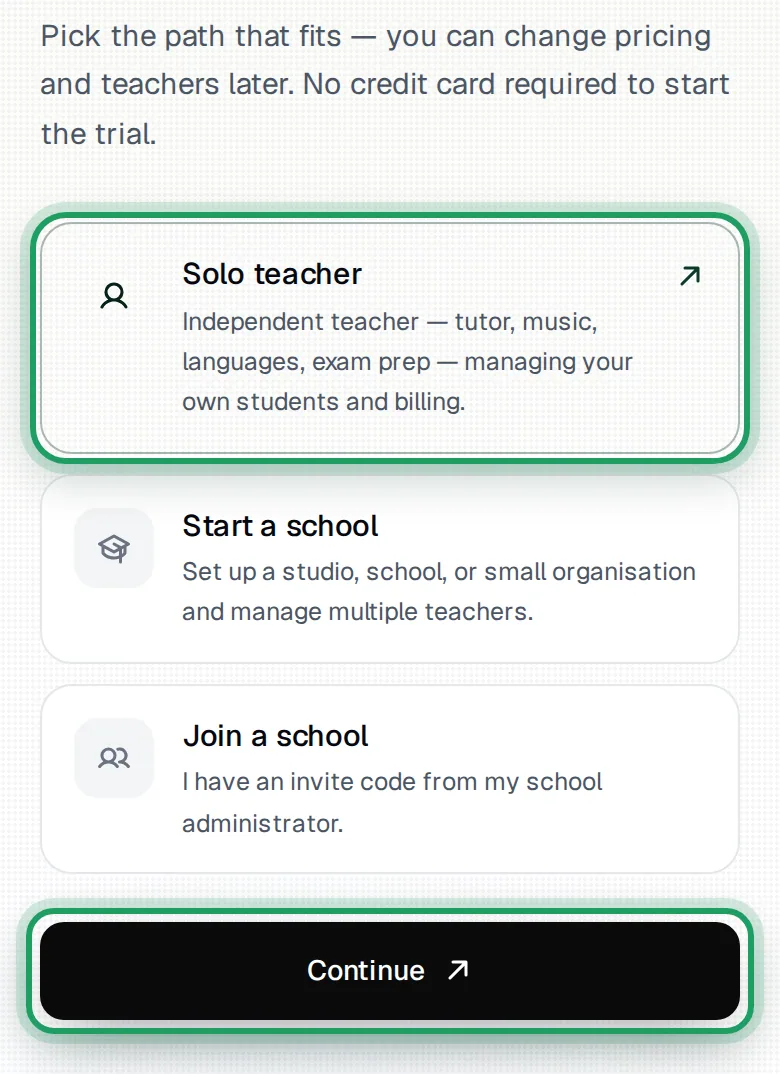
On Get started with lessonu., tap Solo teacher, not Start a school.
Tap Continue. It stays greyed out until you pick one.
Create your account
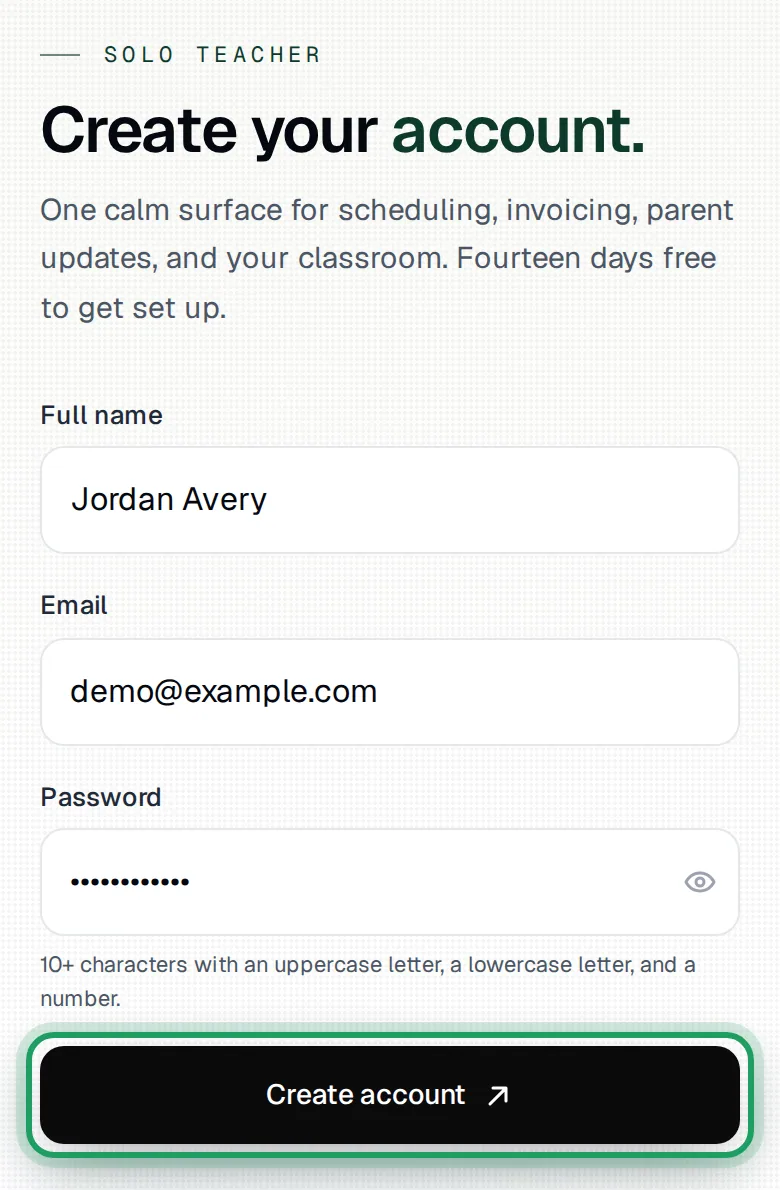
On Create your account., type your name in Full name.
Type your email address in Email.
Make a password in Password.
Use 10 or more characters, with an uppercase letter, a lowercase letter and a number.
To check what you typed, tap the eye at the right of the Password box.
Tap Create account.
You'll see Check your inbox.
Still on the form? Look for a note by an empty box.
Or scroll up to the red box above Full name. It says what went wrong.
Confirm your email
Keep the Check your inbox. page open, and go to your email.
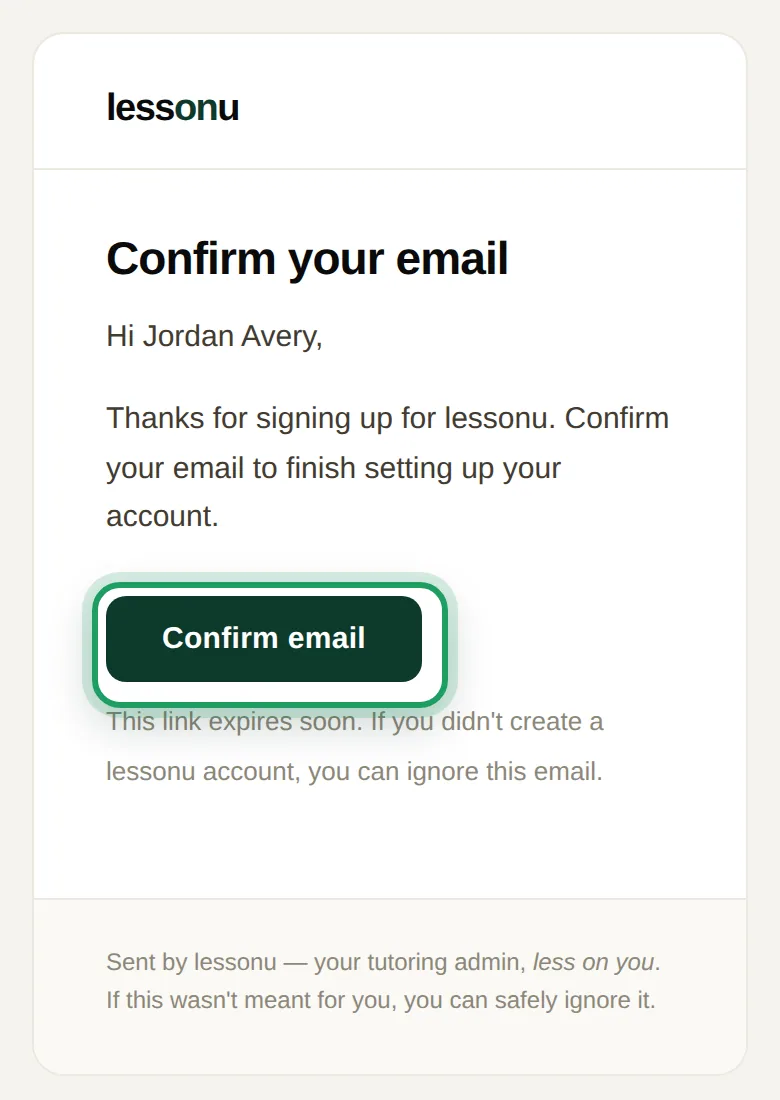
Open the email from lessonu.
Not in your inbox? Check spam.
Tap its confirm button.
lessonu opens, signed in, on your setup guide.
At the top, it says Welcome, then your first name.
The Check your inbox. page doesn't change by itself. Carry on in the new page.
On a phone: it may open inside your mail app, and you're signed in only there.
To use your phone's browser too, sign in at lessonu.com/login.
Sign-up is done. Leave steps 4 to 6 until you're ready to pay.
Next, follow the setup guide, with help from Finish the setup guide.
Later: open Billing
Come back near the end of your trial. Subscribing sooner ends your free days.
On a phone: tap More in the bar at the bottom.
On a phone: scroll down to Account and tap Billing.
On a computer: select Settings in the sidebar. A short list opens under it.
On a computer: select Billing in that list.
During the trial, you'll see Free trial and “Your trial ends” with the date.
Later: choose your plan
During the trial, use Choose your plan on Billing.
On a phone: scroll down past the Free trial box to find it.
Solo is already picked.
Teaching on your own? Keep Solo. It's $19 a month, in Australian dollars.
Tap Subscribe — $19/mo.
The line under it says “You'll be charged $19 today — subscribing now ends your free trial. Cancel any time.”
In the Confirm Plan Change box, tap Subscribe to Solo.
Changed your mind? Tap Go Back.
Trial already ended? On Billing, tap Choose a plan instead.
In Choose a Plan, tap Upgrade on Solo.
In the Confirm Plan Change box, tap Upgrade to Solo.
You're charged straight away, with no new free days.
Later: finish at checkout
A secure payment page from Stripe opens in a new tab.
Pay on that page.
No new tab? On Billing, tap Continue to secure checkout →.
Nothing is charged until you pay on that page.
Watch it on a computer
Good to know
- The trial ends 14 days after you tap Create account, at the same time of day, not at midnight. Sign up at 9 am on 27 October, and your account pauses at 9 am on 10 November.
- If the trial ends before you subscribe, your account pauses. You can still open everything, but most changes are refused, often with “Your trial has ended — subscribe to make changes.” You can still mark invoices and lessons as paid.
- The trial is on the Solo plan: 1 teacher, unlimited students and a 5 GB resource library. Its video classroom holds 2 people (you and one student), with 20 video hours a month.
Questions
Do I need to cancel before the trial ends?
No. lessonu has no card for you, so nothing is charged.
If you don't subscribe, your account pauses. Your data is kept for at least 90 days.
To see your end date, open Billing. It says “Your trial ends” and the date.
The email hasn't come, or I typed the wrong address. What do I do?
Check the address shown on the Check your inbox. page.
Wrong? Next to Wrong email?, tap Sign up again, and use the right address.
Right? Check spam, and search your email for lessonu.
Then tap Resend email on the Check your inbox. page.
Greyed out? Wait for its 60-second countdown to finish.
Still nothing? This email may already have a lessonu account.
Tap Back to sign in, and sign in.
Forgot your password? Tap Forgot password? on the sign-in page.
I confirmed my email, but lessonu asks me to sign in. Why?
Confirming signs you in only where the link opened, such as inside your phone's mail app.
Go to lessonu.com/login in the browser you want to use.
Type your Email and Password.
Tap Sign in.
Seeing “Email verified — sign in to continue.”? You're confirmed, so sign in.
Seeing “Email verification failed”? If you've confirmed once already, ignore it and sign in.
Not confirmed yet? Sign-in says “Invalid email or password” until you do.
To get a new link, tap Resend email on the Check your inbox. page.
The form asks for a School name. How do I go back?
You're setting up a school, with the School plan and a Create school button.
This happens after Start a school, or from the pricing page with a plan other than Solo picked.
Teach on your own? Don't tap Create school.
Tap Back to account type.
Tap Solo teacher.
Tap Continue.
Start 14 days free opens a dashboard, not the sign-up page. Why?
This browser is already signed in to a lessonu account.
Sign out first.
On a phone: tap More, then Sign out.
On a computer: select Sign out at the bottom of the sidebar.
Then go to lessonu.com and tap Start 14 days free again.
My timezone is wrong. How do I change it?
lessonu takes your timezone from your browser when you sign up.
A zone it doesn't list becomes Sydney.
On a phone: tap More, then Settings under Account.
On a computer: open the Settings group in the sidebar, then select Settings.
Settings opens on Profile.
Change Timezone.
Tap Save changes.
You'll see Saved.
What’s nextFinish the setup guide